The best barcode scanner app for price comparison is one that reads the product's UPC and shows the same item's price at many stores near you, not just one retailer. Look for accurate barcode matching, broad local store coverage, in-stock status, fast results, and extras like price-match indicators, receipt scanning and price-drop alerts.
The 4 types of barcode scanner apps
"Barcode scanner" covers very different apps. Only one type is built to answer the question shoppers actually have: is this cheaper somewhere else?
| Type | What it does | Good for | Limitation |
|---|---|---|---|
| Store apps e.g. a retailer's own app | Scans an item and shows that store's price, deals and stock | Checking a shelf price or a store coupon | Won't tell you if a competitor is cheaper |
| Visual search e.g. camera search tools | Identifies a product from a photo and shows shopping results | Items without a visible barcode | Can match similar, not identical, products. Mostly online prices |
| Generic barcode readers | Decodes the barcode number or QR link | Reading QR codes and product numbers | Little or no price information |
| Price-comparison scanners e.g. Price Match Paradise | Looks up the exact UPC across many stores and ranks prices | Deciding where to buy, and price matching | Quality depends on store coverage and data freshness |
If you want to save money, you need the fourth type. The others are useful, but they either show one store's price or can't guarantee it's the identical product.
8 features that actually matter
1. Exact barcode matching
The app should match the product by its UPC or EAN, not by a fuzzy name search. That's what makes the comparison trustworthy and what stores require for price matching. (New to barcodes? Read how to compare prices by scanning a barcode.)
2. Many stores, including local ones
A comparison is only as good as the stores in it. Look for a mix of big-box, grocery, pharmacy, warehouse clubs and online retailers, and prices for stores near you, not just national websites.
3. In-stock status
A low price at a store that's sold out doesn't help, and stores won't price match an out-of-stock item.
4. Speed
If a scan takes 20 seconds, you'll stop using it by the third aisle. Results should appear in a couple of seconds.
5. Price-match help
The most useful scanners show which stores price match and give you a clean screen to show the cashier. Our price matching guide explains why that matters.
6. Receipt scanning
Scanning a receipt after you shop shows what you overpaid for across the whole trip, not just one item.
7. Price-drop alerts
Alerts on the items you buy most often tell you when to stock up, and when a store's price-drop refund window is worth using.
8. Low friction and privacy
You should be able to try it without creating an account or entering a card. Check what permissions it asks for. Camera access is needed, and location helps find nearby stores, but you should be able to understand why each one is needed.
Quick checklist
| Feature | Why it matters | Price Match Paradise |
|---|---|---|
| Exact UPC matching | Same product, fair comparison | Yes |
| Many stores compared | Finds the real lowest price | 50+ supported retailer sources |
| In-stock status | Only prices you can actually get | Yes |
| Fast results | Usable in the aisle | Designed for quick in-aisle use |
| Price-match indicators | Know who will match | "Price Match" badges |
| Receipt scanner | Find overpays after the trip | Yes |
| Price-drop alerts | Buy at the right time | Yes |
| No account to start | Try it in seconds | Yes |
What a price-comparison scan looks like
- Scan the barcode of the item on the shelf with Price Match Paradise. No account needed to start.
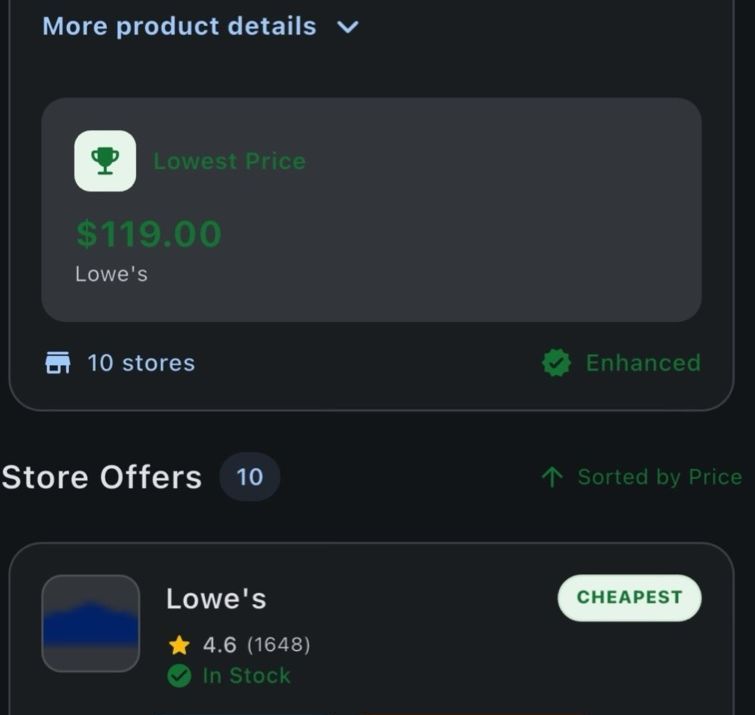
- Review matching offers across supported retailer sources, with stock status and price-match guidance when the retailer data is available.
- Decide in the aisle: ask for a match, buy it here because it's already the best price, or pick it up where it's cheaper.
How to test any scanner app in 5 minutes
- Grab 5 items from your pantry: a name-brand snack, a cleaning product, a medicine or vitamin, a store-brand item and something small like gum.
- Scan each one and time it. Did it recognize all five? Store brands and small UPC-E codes are a good stress test.
- Check the matches. Is it the exact size and variant, or a lookalike?
- Look at the store list. Are stores you actually shop at included, with local prices and stock?
- Try the extras: scan a receipt and set an alert on something you buy often.
An app that passes all five is worth keeping on your home screen.
Where a scanner saves the most
- Identical, frequently bought items: diapers, formula, coffee, detergent, paper goods, vitamins, medicine.
- Higher-priced items: small appliances, electronics, tools, toys. Even small percentage gaps are real money.
- Stores that don't match competitors, like Walmart and Target, where checking first is the only protection.
- Sale events, to check whether a "deal" is really the lowest price. See how to spot a fake sale.
FAQ
What is the best barcode scanner app for comparing prices?
Look for a price-comparison scanner rather than a store app or a generic reader. It should match products by UPC, cover many local stores with stock status, return results in seconds, and ideally show price-match options, scan receipts and send price-drop alerts.
Can a store's own app compare prices with other stores?
Generally no. Store apps show their own price, deals and stock. To see whether another store is cheaper, you need a price-comparison scanner.
Do barcode scanner apps work without internet?
The camera can read a barcode offline, but looking up current prices across stores needs a data connection.
Are barcode scanner apps free?
Many are free to start. Price Match Paradise is free to download and doesn't require an account or card to start scanning.
Why can't a scanner app find some products?
New, regional and store-brand products, and store-printed labels for weighed items, may not be in the database. Scan the barcode printed on the package itself for the best results.
The scanner built for saving money.
Scan any barcode and see the same item at 50+ supported retailer sources in one search. Free to start, no account needed.
Keep reading
Price Match Paradise Team
We build the barcode price comparison app that helps shoppers find the lowest price on the item in their hand. Spotted a policy change? Let us know.